반응형
출처 - http://jasperslab.blogspot.kr/2013/01/android-notifications.html
[1] Notification 표시 영역
notification 아이콘은 notification area라는 상단의 status bar의 앞쪽에 나타난다. notification의 상세 내용은 사용자가 notification drawer를 열어서 볼 수 있다. 두 영역이 모두 system-controlled area로서 사용자는 언제든 살펴볼 수 있다.
 |
| Notifications in the notification area |
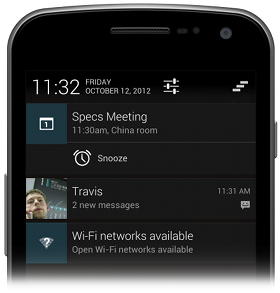 |
| Notifications in the notification drawer |
- Notification Design 가이드는 여기를 참고
- NotificationCompat.Builder 클래스는 version 4 Support Library로 제공.
[2] Notification 형태
notification은 notification drawer 내에서 표시 형식에 따라 normal, big 두 가지 형태로 구분된다.1. Normal View
 |
| Notification in normal view |
(1) Content title
(2) Large icon
(3) Content text
(4) Content Info
(5) Small Icon
(6) Time that the notification was issued.
2. Big View
 |
| Big view notification |
[3] Notification 만들기
1. Notification 직접 생성
|
1
2
3
4
5
6
7
8
9
10
11
12
13 |
Intent intent = new Intent(getApplicationContext(), NotiResultActivity.class); PendingIntent pendingIntent = PendingIntent.getActivity(getApplicationContext(), 0, intent, PendingIntent.FLAG_UPDATE_CURRENT); Notification notification = new Notification(); notification.icon = R.drawable.ic_launcher; notification.tickerText = "tickerText"; notification.when = new Date().getTime(); notification.number = 10; notification.setLatestEventInfo(getApplicationContext(), "contentTitle", "contentText", pendingIntent); int notiId = 1; NotificationManager mNotificationManager = (NotificationManager) getSystemService(Context.NOTIFICATION_SERVICE); mNotificationManager.notify(notiId, notification); |
단, Notification이 생성될 때의 id를 사용해야 한다.
|
1
2 |
NotificationManager mNotificationManager = (NotificationManager) getSystemService(Context.NOTIFICATION_SERVICE); mNotificationManager.cancel(1); |
2. Notification.Builder 사용
|
1
2
3
4
5
6
7
8
9
10
11
12
13
14
15
16
17
18
19 |
//use Notification.Builder [required API level 11] Intent intent = new Intent(getApplicationContext(), NotiResultActivity.class); PendingIntent pendingIntent = PendingIntent.getActivity(getApplicationContext(), 0, intent, PendingIntent.FLAG_UPDATE_CURRENT); Notification.Builder builder = new Notification.Builder(getApplicationContext()); builder.setSmallIcon(R.drawable.ic_launcher); builder.setTicker("tickerText"); builder.setWhen(System.currentTimeMillis()); builder.setNumber(10); builder.setContentTitle("contentTitle"); builder.setContentText("contentText"); builder.setContentIntent(pendingIntent); builder.setAutoCancel(true); //Notification notification = builder.build();//required API level 16 Notification notification = builder.getNotification(); int notiId = 1; NotificationManager mNotificationManager = (NotificationManager) getSystemService(Context.NOTIFICATION_SERVICE); mNotificationManager.notify(notiId, notification); |
3. NotificationCompat.Builder 사용
추천되고 있는 방식으로는 NotificationCompat 클래스를 사용하는 것이다. 클래스명 뒤에 Compat이 붙는 것은 원래 클래스의 상위 버전에 추가되는 Features에 대응하기 위한 호환성 도우미 클래스 정도라고 생각하면 될 듯하다.|
1
2
3
4
5
6
7
8
9
10
11
12
13
14
15
16
17
18 |
NotificationCompat.Builder mBuilder = new NotificationCompat.Builder(this); mBuilder.setSmallIcon(R.drawable.ic_launcher);//required mBuilder.setContentTitle("contentTitle");//required mBuilder.setContentText("contentText");//required mBuilder.setTicker("tickerText");//optional mBuilder.setNumber(10);//optional mBuilder.setAutoCancel(true); Intent resultIntent = new Intent(this, NotiResultActivity.class); TaskStackBuilder stackBuilder = TaskStackBuilder.create(this); stackBuilder.addParentStack(NotiResultActivity.class); stackBuilder.addNextIntent(resultIntent); PendingIntent resultPendingIntent = stackBuilder.getPendingIntent(0, PendingIntent.FLAG_UPDATE_CURRENT); mBuilder.setContentIntent(resultPendingIntent); NotificationManager mNotificationManager = (NotificationManager) getSystemService(Context.NOTIFICATION_SERVICE); mNotificationManager.notify(1, mBuilder.build()); |
위 코드에서는 TaskStackBuilder 클래스가 사용되었다. 자세한 내용을 여기를 참조.
[4] ProgressBar 추가하기
1. API level 14 이상에서
API level 14 (안드로이드 4.0 아이스크림 샌드위치) 이상에서는 아래의 코드로 간단하게 ProgressBar 구현이 가능하다.|
1
2
3
4
5
6
7
8
9
10
11
12
13
14
15
16
17
18
19
20
21
22
23
24
25
26
27
28
29
30
31
32
33
34
35
36
37
38
39 |
Intent resultIntent = new Intent(this, NotiResultActivity.class); TaskStackBuilder stackBuilder = TaskStackBuilder.create(this); stackBuilder.addParentStack(NotiResultActivity.class); stackBuilder.addNextIntent(resultIntent); PendingIntent resultPendingIntent = stackBuilder.getPendingIntent(0, PendingIntent.FLAG_UPDATE_CURRENT); notificationManager = (NotificationManager) getSystemService(Context.NOTIFICATION_SERVICE); builder = new NotificationCompat.Builder(getApplicationContext()); builder.setSmallIcon(R.drawable.ic_launcher); builder.setContentTitle("contentTitle"); builder.setContentText("contentText"); builder.setTicker("tickerText"); builder.setContentIntent(resultPendingIntent);//required builder.setAutoCancel(false); final int ID = 1; final int MAX = 100; new Thread( new Runnable() { @Overridepublic void run() { for (int incr = 1; incr<=100; incr+=1) { builder.setProgress(MAX, incr, false); notificationManager.notify(ID, builder.build()); try { Thread.sleep(1000L); } catch (InterruptedException e) { Log.e("Noti_Progress", "sleep failure"); } } builder.setContentText("Progress Complete"); builder.setProgress(0, 0, false);//removes the progress bar builder.setAutoCancel(true); notificationManager.notify(ID, builder.build()); } } ).start(); |
2. RemoteViews 이용한 구현
API level 14 미만에서는 직접 구현하는 수밖에 없다. RemoteViews를 이용해서 아래와 같이 구현한다.noti_progressbar.xml
|
1
2
3
4
5
6
7
8
9
10
11
12 |
<RELATIVELAYOUT xmlns:android="http://schemas.android.com/apk/res/android" android:layout_width="fill_parent" android:layout_height="fill_parent" android:id="@+id/noti_layout"> <TEXTVIEW style="android: style/TextAppearance.Small.Inverse" android:layout_width="wrap_content" android:layout_height="wrap_content" android:id="@+id/noti_title" android:layout_alignparenttop="true" android:layout_alignparentleft="true"> </TEXTVIEW> <PROGRESSBAR style="android: attr/progressBarStyleHorizontal" android:layout_width="fill_parent" android:layout_height="wrap_content" android:id="@+id/noti_progress" android:layout_alignparentleft="true" android:layout_below="@id/noti_title"> </PROGRESSBAR> <TEXTVIEW style="android: style/TextAppearance.Small" android:layout_width="wrap_content" android:layout_height="wrap_content" android:id="@+id/noti_text" android:layout_centerhorizontal="true" android:layout_alignbottom="@id/noti_progress"> </TEXTVIEW> </RELATIVELAYOUT> |
|
1
2
3
4
5
6
7
8
9
10
11
12
13
14
15
16
17
18
19
20
21
22
23
24
25
26
27
28
29
30
31
32
33
34
35
36
37
38
39
40 |
final int notiId = 1; final int MAX = 100; notificationManager = (NotificationManager) getSystemService(Context.NOTIFICATION_SERVICE); new Thread(new Runnable() { @Overridepublic void run() { android.os.Process.setThreadPriority(android.os.Process.THREAD_PRIORITY_BACKGROUND); RemoteViews notiDrawerView = new RemoteViews(getPackageName(), R.layout.noti_progressbar); notiDrawerView.setTextViewText(R.id.noti_title, "contentTitle"); notiDrawerView.setProgressBar(R.id.noti_progress, MAX, 0, false); notiDrawerView.setTextViewText(R.id.noti_text, "contentText"); Intent intent = new Intent(getApplicationContext(), NotiResultActivity.class); PendingIntent pendingIntent = PendingIntent.getActivity(getApplicationContext(), 0, intent, PendingIntent.FLAG_ONE_SHOT); Notification notification = new Notification(R.drawable.ic_launcher, "tickerText", System.currentTimeMillis()); notification.flags |= Notification.FLAG_ONGOING_EVENT; notification.contentView = notiDrawerView; notification.contentIntent = pendingIntent; int progress = 0; while (progress <= 100) { progress++; notification.contentView.setProgressBar(R.id.noti_progress, MAX, progress, false); notification.contentView.setTextViewText(R.id.noti_text, String.valueOf(progress)+"%"); notificationManager.notify(notiId, notification); try { Thread.sleep(500L); } catch (InterruptedException e) { Log.e("Noti_Progress", "sleep failure"); } } notificationManager.cancel(notiId); } }).start(); |
참고로 Status bar를 너무 자주 수정하는 것은 좋지 않다는 포스트를 여기에 링크한다.
반응형
'개발 > 안드로이드' 카테고리의 다른 글
| 프로를 위한 팁(ProTip) (0) | 2014.01.03 |
|---|---|
| 안드로이드 GCM 서버 (0) | 2013.11.18 |
| 안드로이드 Notification (안드로이드 알림) (0) | 2013.11.13 |
| Google Expansion File 설명(확장 파일) (0) | 2013.11.12 |
| [Android]Shape 요소 (0) | 2013.11.05 |
댓글